


Stark Fellowship helps a small community look after its people: who belongs, who serves when, who came, who gave, and who needs a visit or a hand. It is made for congregations of any faith (churches, mosques, synagogues, temples, gurdwaras, meeting houses) and for secular civic, mutual-aid and neighbourhood associations, equally. The words on screen are neutral: community, leader, member, gathering, giving, care.
Everything stays on your community's own computer, encrypted. There is no account, no cloud, no payment processing and no messaging. The app contains no network code at all.
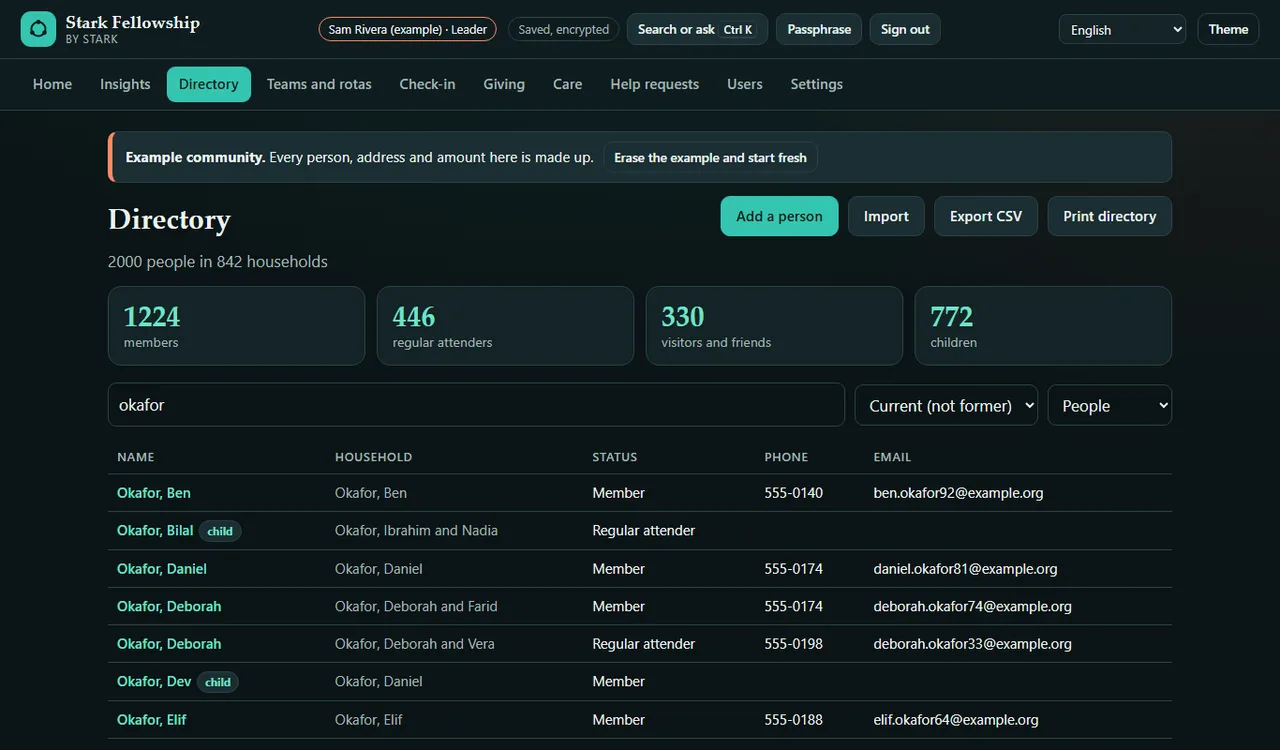
Directory of households and members
- Households with their members, adults and children, status (member, regular attender, visitor, friend, former) and contact details.
- Fast search by name, household, email or phone digits across 2,000 people and more.
- Import from a spreadsheet: paste rows or choose a CSV file. Export to CSV, or print a members-only directory that leaves out anyone who asked not to be listed.
- Birthdays this week on the home page.
Teams and rotas
- Volunteer teams with a lead, dated rota slots, and "repeat weekly".
- Coverage at a glance: places to fill, gaps, and clashes (someone in two places at once, or booked on a day they said they are away).
- Fill gaps fairly: spreads turns evenly across each team, skipping anyone away or already serving at that time.
- Print the rota or export it as CSV.
Gatherings and check-in
- Big, tap-friendly check-in by name or household, with one-tap undo.
- Whole-household check-in and walk-in guests.
- Children get a four-character pickup code to match when they are collected.
- Recent attendance, and a gentle Not seen lately list so nobody is forgotten.
Giving records and year-end statements
- Gifts typed in by hand from envelopes, checks and bank statements, with "Save and add another" for counting day. Loose gifts with no name are counted but never put on a statement.
- Funds (general, building, help, outreach, or your own) kept as real double-entry books: fund balances, trial balance and journal, so the money held always equals the funds.
- Non-cash gifts are described, never valued. Gifts where something was given in return (a dinner ticket, say) record a good-faith value.
- Year-end statements for every giver, printed one by one or all at once, and single-gift receipts. The wording follows common US practice, for example "No goods or services were provided in exchange for this contribution", with an optional wording for religious organizations ("other than intangible religious benefits"), and a note to check with an accountant.
- Close a year once statements are sent, so nothing in it changes by accident.
Care and help
- A care log of visits, calls and follow-ups, with follow-ups due on the home page.
- Private care notes are encrypted with their own key. Only the Leader and Care team roles hold it; everyone else cannot open the notes at all, not just "cannot see them".
- Help requests (sometimes called benevolence) from members and neighbours: need, amount asked, decision, amount given and referral, with an option to record the payment in the books from the Help fund.
One shared computer, six roles
- Each person signs in as themselves with their own passphrase. Roles: Leader, Administrator, Care team, Treasurer, Team coordinator, Check-in helper.
- Reading rights are enforced by encryption: the records are split into six parts (names, contact details, giving, care visits, private notes, help requests), each with its own key, and a role only receives the keys it is allowed. A check-in helper can check people in but never sees an address, a gift or a care note.
- You can only give access you hold yourself, and every person starts on the home page after signing in.
- Automatic sign-out after quiet minutes, an activity log (actions, never details), and a one-file encrypted backup.
Languages
- The screens are available in 16 languages: choose one from the menu at the top, or the app uses your browser's language. Arabic reads right to left.
Honest limits
- Screen translations are machine drafts awaiting native review. A few messages and the sample records stay in English, and printed statements, receipts and directories are always in English.
- Not tax, legal or accounting advice. Statement wording follows common US practice for written acknowledgments (IRS Publication 1771). Rules differ by country and change; have an accountant or tax adviser check the wording before you send statements. US dollars only. No UK Gift Aid or other national schemes.
- No payments, ever. Stark Fellowship records gifts that were made elsewhere. It does not take cards, bank transfers or online giving.
- No messaging. It does not send email or texts. Export a CSV for your own mail program if you need to.
- One computer, one browser profile. No sync between computers and no phone app. Several people can share the one computer, each with their own sign-in. Clearing the browser's site data deletes the records, which is why the backup exists.
- What the roles protect. Reading is enforced by encryption. Editing within the parts a role can read is enforced by the app, not by cryptography. Someone with full access to the Windows account cannot read what they hold no key for, but they can delete the stored data. The community name and the user names and roles are stored unencrypted so the sign-in screen can list them.
- Lost passphrases. A Leader can set a new passphrase for any user; an Administrator can for users without care-note access. If every Leader forgets theirs, the private care notes cannot be recovered by anyone, including Stark. Keep two Leaders and keep backups.
- Sensitive data. Religious affiliation and care notes are special-category data in many places (for example under the GDPR). Your community decides what to record and is responsible for consent and safe handling.
- Children. Pickup codes are a convenience, not a safeguarding system. Follow your own safeguarding policy. There are no printed labels; write the code on a sticker. No background checks.
- Not included in 1.0: pledges and campaigns, a calendar or room booking, photo directories, sign-up forms, multi-site communities.
- Tested with 2,000+ people, about 10,000 gifts and six users on one computer.