Stark Family Vault is a private, offline place for the papers and facts your family would need in a bad week. Everything is encrypted on your computer. There is no account, no server, no analytics and no network access at all.
New in version 1.1.0
Emergency plan and go-bag. Meeting places, an out-of-area contact, shut-offs, escape routes, school and pet plans. Tick the hazards where you live and the go-bag checklist adapts to them, to your family's ages, medicines, allergies and pets.
"In case of emergency" binder. One printout with everything someone would need: who to call, the plan, medical summaries and medicines, insurance, where every original document is kept, accounts (last 4 digits), digital wishes, key roles, final wishes and letters. Choose the people and sections. Scans are never printed, and password hints only if you tick the box.
Insurance registry. Every policy with who it covers, cover limits, premiums (with a yearly total), renewal dates, agents, claims lines and beneficiaries, plus a gentle list of common types you have not recorded.
Medicine lists. Name, dose, how and when, prescriber and pharmacy for each person, with refill reminders, a printable list for appointments, and the emergency card filled in automatically.
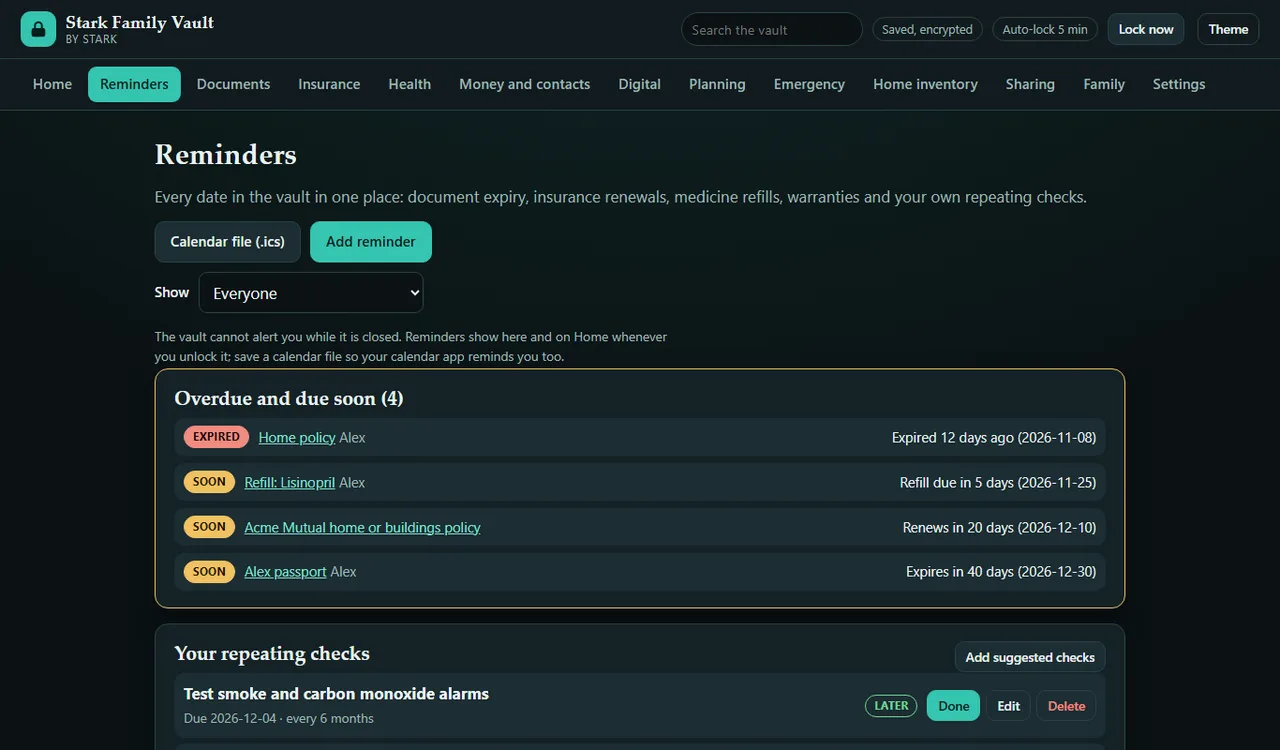
One reminders page and a calendar file. Document expiry, policy renewals, medicine refills, warranties and your own repeating checks (alarm tests, go-bag refresh, yearly review) in one list. Export a standard .ics file so your calendar app reminds you too.
Digital legacy. Accounts and devices, what should happen to each (memorialise, close, download first, hand over), whether a legacy contact is set up, and a 9-step digital legacy checklist.
Password hints, never passwords. Hints are hidden until you click Show, left out of search, share files and printouts unless you choose otherwise, and the app warns you when a hint looks like a real password.
Estate planning by jurisdiction type. Tick what fits (common-law, civil-law, marital property rules, religious or customary rules, cross-border, business owner, dependant with extra needs) and the checklist adds the questions to take to a qualified local professional. Plus key roles (executor, guardians, powers of attorney) and final wishes.
Home inventory for claims. Quantities, brand and model, up to three photos and a receipt per item, warranty dates, a printable claim report with photos and receipts, and a spreadsheet (CSV) export.
Search and readiness. Search the whole vault from the top bar, and see a family readiness score on Home with a link to each missing step.
What you can keep
Documents. IDs, passports, deeds, vehicle titles, birth certificates. Store a scan or photo of each (JPG, PNG or PDF), note where the original is kept, and set an expiry or renewal date with a reminder window you choose.
Health. A medical summary for each person and a structured medicine list. Print a clean emergency card for the wallet or the fridge.
Insurance. Every policy, its renewal date, claims line and agent.
Contacts and money. Emergency contacts and a list of financial accounts. Institution and last 4 digits only. The app trims longer entries and blocks notes that look like full card numbers, national ID numbers, passwords or PINs.
Digital legacy. Accounts, devices, wishes and hints (never passwords).
Planning. An estate planning checklist with questions by jurisdiction type, key roles, final wishes, and an "if something happens to me" letter builder. General information only; see an attorney or notary to make anything valid where you live.
Emergency plan. The plan, the go-bag and the printable binder.
Home inventory. Items with photos, receipts, values and warranties, a claim report and a CSV export.
Sharing. Export an encrypted share file for a trusted person: choose the people, the sections, whether scans are included and whether password hints are included. It has its own passphrase. They open it with the same app (read-only), or import it into their own vault. You can also save a full encrypted backup file.
Family. A profile for every family member. Filter any section by person.
How it protects you
AES-256-GCM encryption through your browser's built-in WebCrypto. Every new 1.1 record (policies, medicines, digital accounts, the emergency plan, reminders, extra photos and receipts) lives inside the same encrypted vault.
The key is derived from your passphrase with PBKDF2-SHA256, 600,000 iterations and a random salt per vault.
GCM authenticates everything: a damaged or edited file is refused rather than half-opened, and the file header is bound to the data. Imported files are strictly checked before use.
Every save is read back and checked, and the last good copy is kept.
A passphrase strength meter on creation, with a minimum you cannot skip.
Auto-lock after inactivity (1 to 30 minutes), and a lock button. Locking removes your data from memory and the screen.
Your passphrase is never stored. Only the encrypted file is saved, in your browser's own storage.
A strict content security policy blocks every network connection. The app contains no code that can send data anywhere.
Honest limits
If you lose your passphrase, your data is gone. There is no reset, no recovery email and no back door. We cannot see your data, so we cannot help recover it. Give a trusted person a sealed copy of the passphrase, for example through your attorney.
It cannot protect you from malware on your computer, from someone watching you type, or from a weak passphrase. Printed cards, binders, claim reports, letters, calendar files, CSV files and saved scan copies are not encrypted.
The vault cannot alert you while it is closed. Reminders show when you unlock it; export the calendar file if you want your calendar app to remind you.
Your vault lives in this browser's storage on this computer. Clearing site data or reinstalling would erase it, so save a backup file now and then. The app reminds you.
Never store full account numbers, passwords, PINs or recovery phrases here. Use a password manager with an emergency-access contact for those. The password-hint warning is a heuristic and can miss things.
The estate checklist is organisation help, not legal advice. It lists questions to ask; it does not say what the law is anywhere. Rules differ by country and state and change over time.
The go-bag list is general. Follow your local emergency agency's guidance for your area.
The claim report is an organised list from your own records, not any insurer's claim form. This is a record-keeping tool, not legal, medical, tax, insurance or financial advice.
Good to know
Works in current Chrome, Edge, Firefox and Safari. No install: unzip and open index.html, or play it on this page.
Light and dark themes, works on a phone-sized screen, and prints cleanly.
Vaults from version 1.0 open in 1.1.0 unchanged; the new sections start empty.
One purchase covers your whole household.
Price
$15 one-timeregular price $15sale price $10.50 one-time Black Friday to Cyber Monday: 30% off
Standard: $15 one-timeregular price $15sale price $10.50 one-time Black Friday to Cyber Monday: 30% off. Paid once on itch.io, no subscription
Sold on itch.io. Refunds on request within 7 days, through itch.io. Refund policy
A current desktop browser: Chrome, Edge, Firefox or Safari
No install and no account; works offline once downloaded
Honest limits, in short
If you lose your passphrase, your data is gone. There is no reset, no recovery email and no back door. We cannot see your data, so we cannot help recover it. Give a trusted person a sealed copy of the passphrase, for example through your attorney.
It cannot protect you from malware on your computer, from someone watching you type, or from a weak passphrase. Printed cards, binders, claim reports, letters, calendar files, CSV files and saved scan copies are not encrypted.
The vault cannot alert you while it is closed. Reminders show when you unlock it; export the calendar file if you want your calendar app to remind you.
Your vault lives in this browser's storage on this computer. Clearing site data or reinstalling would erase it, so save a backup file now and then. The app reminds you.
Never store full account numbers, passwords, PINs or recovery phrases here. Use a password manager with an emergency-access contact for those. The password-hint warning is a heuristic and can miss things.
The estate checklist is organisation help, not legal advice. It lists questions to ask; it does not say what the law is anywhere. Rules differ by country and state and change over time.