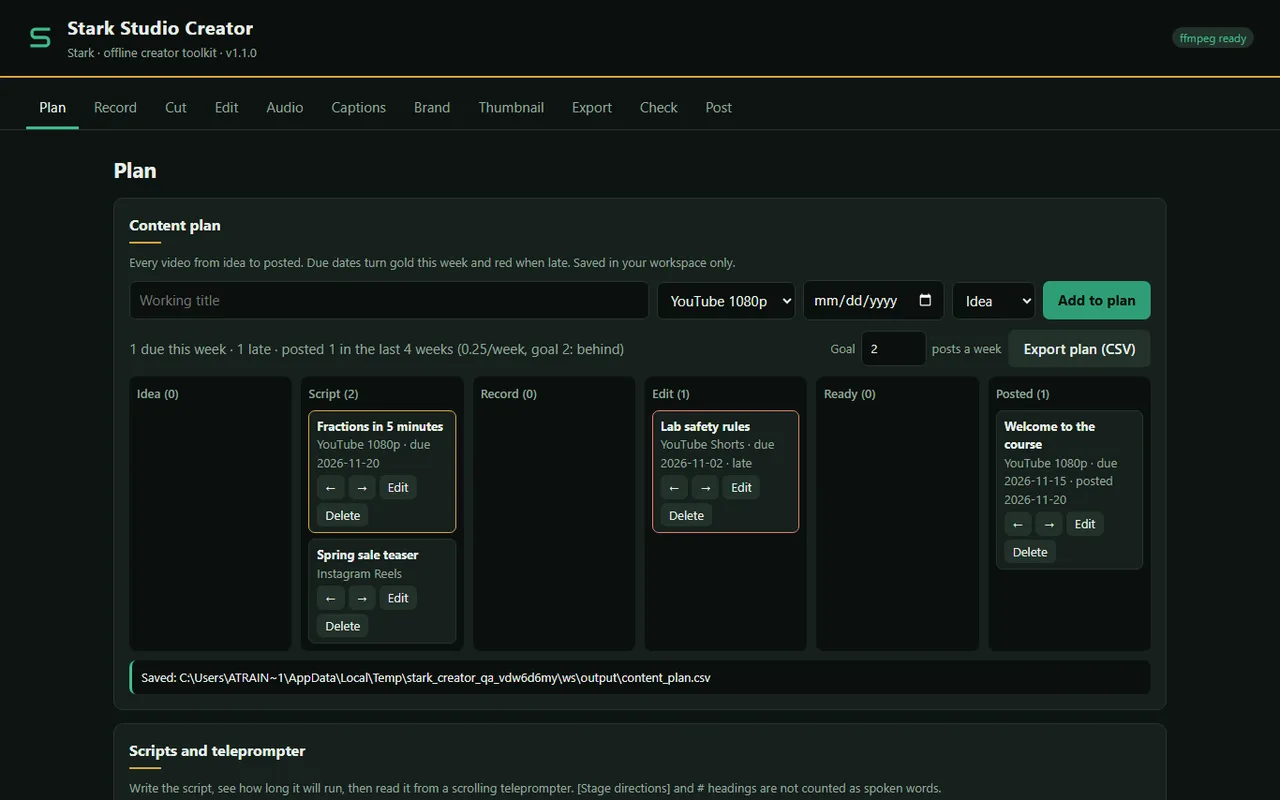
Stark Studio Creator is a small video studio that lives on your own computer. It plans your videos, holds your scripts and reads them back on a teleprompter, sets up OBS to record, cuts and joins your takes, cleans up your voice, adds music that ducks under you, writes and checks captions, puts your logo and name on screen, hides what should stay private, checks the file against where you will post it, and exports every shape and size you need.
It opens in your browser on a local address (127.0.0.1) and never touches the network. There is no account, no cloud, no AI and no subscription. The video work is done by ffmpeg, the free tool that is installed on your machine. You post; the app never logs in anywhere.
Made for independent creators, teachers and schools, and small businesses who want the polish without the monthly bill or the upload.
New in 1.1
- Content plan. Every video from idea to posted on one board (idea, script, record, edit, ready, posted). Due dates turn gold this week and red when late, a posts-per-week goal tells you if you are on track, and the plan exports to CSV for a team meeting or a class.
- Scripts and a teleprompter. Five starting templates (tutorial, lesson for a class, product demo, announcement, short). See spoken words and running time per section at your speaking pace; [stage directions] and headings are not counted. A full-screen teleprompter with a 3-2-1 countdown, speed and text size controls, a mirror mode for beam-splitter glass, and keyboard control.
- Cut and join. A preview player with Mark in and Mark out. Join pieces from one or many files in any order, with optional crossfades. Change speed from 0.5x to 3x with the voice at its natural pitch.
- Clean up voice. Cuts rumble and 50 or 60 Hz mains hum, reduces steady background noise in three strengths, softens harsh "s" sounds and evens out the level, then sets loudness.
- Background music with ducking. Your track loops to the video length, fades in and out, and dips automatically while someone speaks.
- Caption editor. Write captions while you watch, or open an .srt or .vtt to fix it. Check flags captions that are too fast to read (you set the limit), too long, too wide or overlapping, wraps long lines, shifts timing, and saves SRT, WebVTT and a plain transcript in one click. Burn them in straight away if you like.
- Brand kit. Your name, role or tagline, colours and logo. Adds a logo watermark in any corner and a name lower third; title cards and thumbnails pick up your accent colour.
- Blur or cover a region. Drag a box over a face, a name tag, an email address or a password, choose when it shows, and hide it with coarse blocks or a solid cover.
- More exports. Square 1:1 and portrait 4:5 feed presets, a "fit with blurred background" option instead of cropping, podcast MP3 at -16 LUFS, animated GIF, and "fit a size limit" for email, chat apps and school or work upload limits.
- Check before posting. Checks shape, resolution, length, codecs, loudness, peaks, a silent opening, frame rate, file size and fast start for YouTube, Shorts, Reels, TikTok, feed posts, email and classroom uploads, and tells you how to fix each problem.
- Use any finished file as the next input, so you can join, then brand, then export without hunting for paths.
From 1.0
- OBS setup assistant that writes its own new profile and scene collection and never changes yours, plus a one-click record session.
- Silence trimming, two-pass loudness normalisation, chapters from pauses, smart 9:16 crop, burned-in captions and title cards.
- Thumbnail maker with eight candidate frames and a text overlay at 1280x720.
- Batch export for YouTube 1080p, Shorts, Reels and TikTok, posting checklists and copy templates.
Privacy
- No network code, no accounts, no analytics. The app binds to 127.0.0.1 and refuses requests from other sites.
- Your videos, plan, scripts and brand kit stay in one folder in your user profile.
- Finished files never overwrite older ones.
Honest limits
- Windows first. The code is plain Python and runs elsewhere, but the OBS setup and launcher are written for Windows.
- It is not a multi-track timeline editor. Cut and join makes one sequence of pieces with optional crossfades; there are no layers, keyframes, effect libraries or stock media.
- No automatic transcription. Captions are typed or imported, then checked. Nothing listens to your audio.
- Voice cleanup is classic audio filtering, not AI. It reduces steady noise (fans, hiss, hum); it does not remove barking, traffic bursts or room echo.
- Blurred regions are fixed boxes and do not follow a moving face. Use Cover for anything that must never be readable, such as text or passwords.
- The pre-post check uses the limits built into 1.1. Platforms change their rules; check the platform's own help page before an important upload. Size limits count 1 MB as 1,000,000 bytes, and the 18 MB email setting leaves room for the third that attachments grow when they are sent.
- The preview player plays MP4 and WebM files inside the workspace. Other formats still cut by typed times.
- One computer, one person. The plan and scripts do not sync to a team or a calendar, and nothing is scheduled or posted for you.
- The teleprompter runs in the browser window; it does not start or stop OBS.
- Loudness lands within about 1 LU of the target on normal speech; very short or very quiet clips can land a little off.
- Use music, logos and footage you have the rights to.
- English only for now.
What you need
Windows 10 or 11, Python 3.10+, ffmpeg (winget install Gyan.FFmpeg), OBS Studio for the Record tab.
FAQ
Does it upload to YouTube, TikTok or my school's LMS? No. It prepares the files, captions and copy; you post.
Does it need internet? No. It binds to 127.0.0.1 only.
Does it use AI? No. Every tool is ffmpeg filtering and plain maths you can read in the source.
Will it overwrite my files? No. Every output gets a new name.
Refunds? Seven days, no questions.