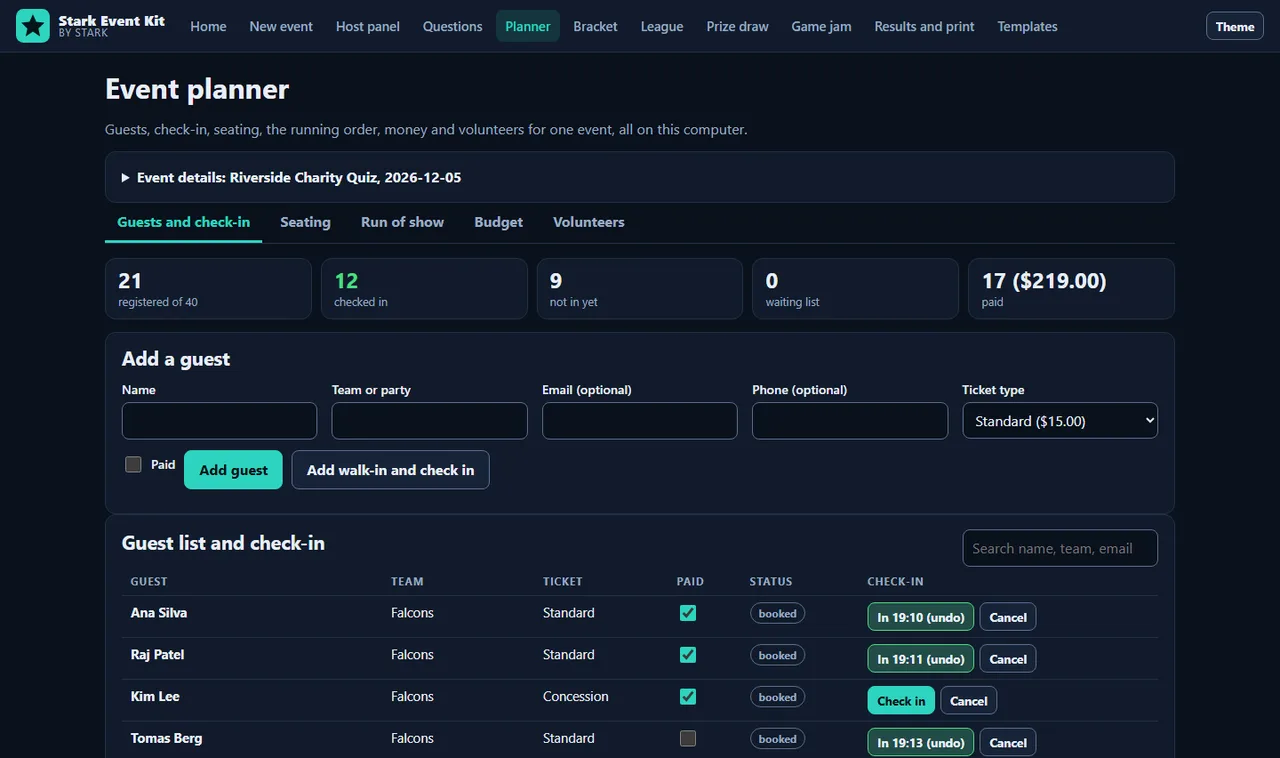
Stark Event Kit turns one computer and a projector into a complete event kit: plan the event, check guests in, seat them, run the quiz or tournament, draw the raffle fairly, and print the certificates. Put the big display on the screen for the room, keep the host panel with the answers on your own monitor, and let the windows talk to each other with no network at all.
Plan the event
- Guests and check-in: capacity with an automatic waiting list, ticket types and prices, paid flags, notes, fast search and a big check-in button for the door. Walk-ins are added and checked in at once. Import a CSV from any sign-up form and export it again.
- Seating: add round or long tables, then seat everyone in one click. Teams and parties stay together; a party is only split if it is bigger than any free table. Move anyone by hand, and print a seating chart or table cards.
- Run of show: segments with minutes, owners and cue notes; start times are worked out for you. Start the show and the planner tracks the current segment, time left, how late or early you are and the projected finish.
- Budget: estimate and actual for every cost and income line, forecast totals, cost per head, break-even ticket price and a by-category view. Export to CSV.
- Volunteers: roles and shifts, people per shift, a fair auto-fill that spreads hours evenly and never double-books, clear warnings for gaps and clashes, and a printable roster.
Host screen and host panel
- Presenter view for a projector: huge question text, answer choices, timer, answer reveal, round scoreboards and a final podium.
- Host panel in a second window on the same machine: next, back, reveal, start and pause the timer, mark each team right or wrong, adjust points, jump to any question.
- Stream overlay in a third window for streaming software: question, timer, standings and a scrolling ticker on green, clear or dark.
- The windows stay in sync through the browser's BroadcastChannel (with a storage fallback). Press F for fullscreen. Keyboard shortcuts work from the host and the projector.
600+ original questions
- 612 questions across 12 categories (geography, history, science, nature, space, technology, mathematics, literature, film and TV, music, sport, food and language) and 3 difficulties, 17 per category and difficulty.
- Written for this kit, checked for accuracy, with source notes where a fact needs one. The built-in tests re-compute every mathematical answer and verify the dated facts.
- Question editor: add your own questions, with optional pictures from your own disk. Import and export JSON or CSV to share banks between hosts.
- Pub quiz rounds, buzzer-style (keys 1 to 9, lock-outs, penalties and speed bonus), picture rounds and team mode with turns and steals.
- Bracket tournament generator: 2 to 128 teams, seeded, byes to the top seeds, seed 1 and 2 meet only in the final. Click to advance, undo safely, print or export.
- League: round-robin fixtures (everyone plays everyone once or twice), score entry, and a table ordered by points, score difference, scores for and then the results between tied teams.
- Season ladder: every finished quiz night is added automatically; rank teams by placing points (10, 8, 6, 5, 4, 3, 2, 1) or total score.
- Fair scoring: points per difficulty, optional wrong-answer penalty and speed bonus. Ties are broken in a fixed, visible order; a genuine tie shares the rank.
Prize draw anyone can check
- Paste entrants (or take them from the checked-in guests) with extra tickets as "Name, 3", list the prizes and lock the entries.
- The big screen shows the commitment before anything is drawn. Someone in the room picks any number or word, which is mixed in, so nobody (the host included) could know the result in advance.
- After the draw, reveal the secret and download the draw record. The built-in verifier, or any SHA-256 tool, re-runs it and confirms every winner. Random numbers use rejection sampling, so every ticket has exactly the same chance.
Game jam mode
- Theme generator with optional constraints (60 themes, 20 constraints, lock a theme, full-screen reveal).
- Countdown timer that survives a reload, with presets from one hour to 72 hours.
- Submission checklist you can edit, and a judging rubric with weights, several judges, averaged scores, ranked results and printable score sheets.
Results and print
- Printable answer sheets (numbered lines or full questions with choices), an answer key page and a tie-break line.
- Certificates for the top places and for everyone who took part, in three designs and six colours, with your own wording.
- Name badges, 8 or 6 per US Letter sheet, from the guest list, the teams or a pasted list.
- Results export to CSV (standings and a question-by-question grid) or the full event as JSON.
Templates
- Business: team-building quiz hour, department showdown (buzzers), icebreaker round, offsite game jam day.
- School: classroom reviews (science and maths, humanities), exit-ticket quiz, class tournament day.
- Community: charity quiz and raffle night, pub quiz league season, community trivia night.
Private by design
No account, no analytics, no network calls (the page ships with a strict policy that blocks them). Your guests, teams, scores, questions and pictures stay in this browser on this computer. Saves are verified and keep a last good copy, and one backup file holds everything.
Honest limits
- Everything lives in one browser on one computer. There is no online registration form, ticket payment, email sending or phone voting: import sign-ups as CSV and take payments however you already do.
- Data is stored as plain browser storage, not encrypted, and the backup file is not encrypted either. Keep backups private if they hold guest contact details.
- The prize-draw secret is kept on the host computer until it is revealed, so the fairness proof relies on the audience number being chosen after the commitment is on screen. Check local rules on raffles and lotteries before selling tickets.
- The budget is a planning aid, not accounting software. Name badges are sized for common US Letter badge sheets: print at 100% and test on plain paper first.
- The stream overlay is a window you capture; it does not stream anything by itself.
Requirements
- A current desktop browser (Chrome, Edge, Firefox or Safari). Open the host panel and the other windows in the same browser on the same computer.
- No installation. Works offline once downloaded.