
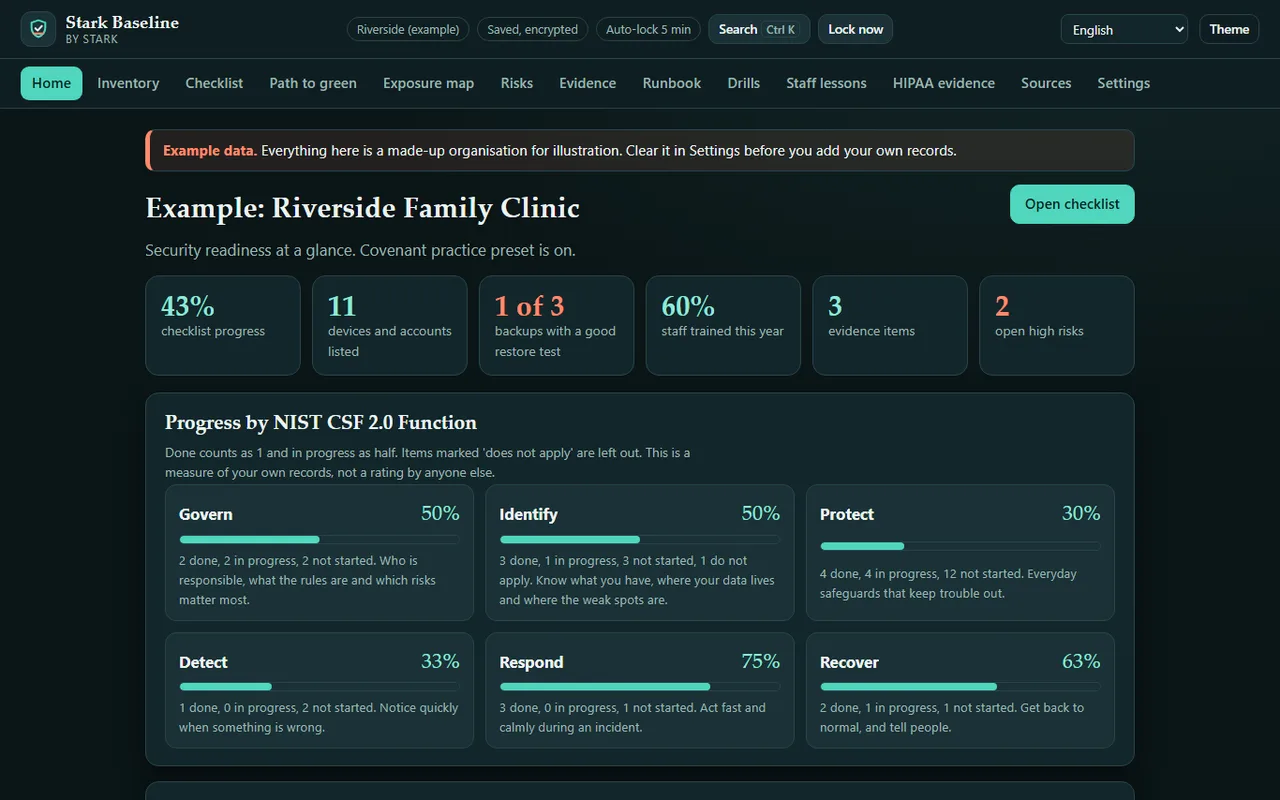


Stark Baseline is a private, offline security readiness kit for small organisations: clinics, schools, small businesses, congregations and non-profits. It helps you organise and track the basics that keep you serving people when something goes wrong: what you have, what is protected, what proves it, and what to do in the first hour of an incident.
Everything stays encrypted on your computer. There is no account, no server, no analytics and no network access at all. Pay once.
Not legal or compliance advice. Stark Baseline helps you organise and track your own security work. It is not an audit, a penetration test or an assessment by anyone else.
What's inside
- Inventory, typed in by hand. Devices (with encryption, updates and whether they hold sensitive data), accounts and online services (with their admin owner and how sign-in is protected), backups (with offline copies and retention), and a map of where your sensitive data lives. Nothing is scanned, installed or monitored. Move each list in and out as a CSV file (handy for IT contractors); imports never overwrite existing entries and skip duplicates. The app refuses notes that look like passwords, PINs, recovery codes or full card numbers, typed or imported.
- A plain-language checklist of 45 steps, grouped by the six NIST Cybersecurity Framework (CSF) 2.0 Functions: Govern, Identify, Protect, Detect, Respond and Recover. Each step shows the CSF 2.0 Category and the CISA Cross-Sector Cybersecurity Performance Goals (CPG) 2.0 goals it relates to, why it matters, how to do it, and what your own records say about it.
- Progress by Function. A score for each of the six Functions and overall (done counts fully, in progress half; steps that do not apply are left out), plus a "Needs attention" list built from your records: backups never restore-tested, accounts without multifactor sign-in, unencrypted devices that hold sensitive data, systems that may be out of support, high risks and overdue actions.
- An encrypted evidence folder. Attach policies, screenshots, contracts, training records and drill reports (up to 5 MB each). Each file is encrypted on its own, tied to its record, and fingerprinted with SHA-256 so damage or tampering is detected. Link evidence to checklist steps.
- A recovery runbook generator with phone trees. Name the incident lead and deputy, build a phone tree (who calls whom), list outside contacts (IT provider, insurer hotline, bank fraud line, vendors) and critical services in restore order with paper fallbacks. Choose from seven scenarios (ransomware, email takeover, lost device, outage, system failure, payment fraud, vendor breach) with first-15-minutes, first-day and recovery steps. Print it or save it as a text file.
- Vendors and agreements. List the suppliers that hold your data or can reach your systems, with the agreement (a business associate agreement for clinics), the breach-notice timeframe they promise, the renewal date and the last review. Missing agreements, passed renewals and stale reviews show up in "Needs attention".
- Evidence that stays current. Mark evidence to be collected again every 3, 6, 12 or 24 months, or by a set date. The Evidence page and "Needs attention" show what is overdue.
- A live incident log. When something happens, start a log on the Runbook page and add a time-stamped note for every call, decision and action, with the first-15-minutes steps beside it. Close it with lessons learned; print it or save it as a text file for your insurer or adviser.
- Guided tabletop exercises. A facilitator view for each of the seven scenarios, with timed events, questions for the room, a running clock and a notes box. Finishing logs the exercise and what was unclear to the drill log.
- A backup restore-drill log. Log restore tests, phone-tree call-outs and tabletop exercises. Every backup shows whether it has had a good restore test within your chosen interval (CISA's goals call for at least once a year).
- Staff awareness lessons. Seven short lessons on the tricks that reach small organisations (pressure and secrecy, payment and invoice fraud, impersonation, fake tech support, sign-in codes, links and call-back numbers, too-good offers), built from the scam-pattern library in Stark Warden and adapted for the workplace, with 19 practice messages. Record who completed which lesson and print a training record.
- Risk list. Threat, weakness, current measures, likelihood and impact, ranked, with an action, owner and due date.
- Covenant practice preset. For clinics: a HIPAA evidence page that organises what a practice gathers for its own HIPAA risk analysis under the elements HHS describes in its risk-analysis guidance (scope, data collection, threats and weaknesses, current measures, likelihood, impact, level of risk, documentation, periodic review, and the follow-on plan), with a review schedule and a printable evidence pack. It helps you organise and track the evidence; it does not perform the analysis.
- Several organisations, one install. Each organisation gets its own encrypted workspace and passphrase, which suits IT contractors who look after several small clients.
- Try it with an example. Load a made-up clinic from Settings to see how everything fits together, then clear it.
How it protects your data
- AES-256-GCM encryption through your browser's built-in WebCrypto. The key comes from your passphrase with PBKDF2-SHA256, 600,000 iterations and a random salt.
- The file header is bound to the data, and every stored item carries a SHA-256 checksum, so a changed or damaged file is refused rather than half-opened.
- Every save is read back and compared, and the last good copy is kept. Damaged data opens in a read-only safe mode instead of being overwritten.
- Changing the passphrase re-encrypts every evidence file. Do it whenever someone who knew it leaves.
- Encrypted backup files carry everything, including evidence, and restore as a separate organisation so nothing is overwritten.
- A strict content security policy blocks every network connection. The app contains no code that can send data anywhere.
Sources
The checklist and preset paraphrase public US government works in plain language and cite them by name. NIST, CISA and HHS have not reviewed or endorsed Stark Baseline.
- The NIST Cybersecurity Framework (CSF) 2.0, NIST CSWP 29 (26 February 2024), https://doi.org/10.6028/NIST.CSWP.29, checked 2026-11-20. A US government work, not subject to copyright in the United States (17 U.S.C. 105).
- Cross-Sector Cybersecurity Performance Goals, Version 2.0, CISA (released 11 December 2025, marked TLP:CLEAR), https://www.cisa.gov/cross-sector-cybersecurity-performance-goals, checked 2026-11-20. A US government work (17 U.S.C. 105).
- Guidance on Risk Analysis Requirements under the HIPAA Security Rule, HHS Office for Civil Rights (July 2010), https://www.hhs.gov/hipaa/for-professionals/security/guidance/guidance-risk-analysis/index.html, checked 2026-11-20.
Languages
- The screens are available in 16 languages: choose one from the menu at the top, or the app uses your browser's language. Arabic reads right to left.
Honest limits
- Screen translations are machine drafts awaiting native review. A few messages and the sample records stay in English, and printed documents are always in English.
- Not legal or compliance advice. It does not say what any law requires of you, and using it does not show that you meet any law, contract, insurance condition or standard. No claims of SOC 2, ISO 27001, CMMC or HIPAA status. Ask a qualified adviser.
- It is not an audit, a penetration test or a formal assessment of any kind. It records what you type in; it does not scan, test or monitor any system or any person.
- The HIPAA preset organises evidence for your own risk analysis. It does not perform the analysis or decide your risk levels for you. HHS proposed changes to the Security Rule in January 2025; check the current rule.
- If you lose the passphrase, the data is gone. There is no reset, no recovery email and no back door.
- Your records live in this browser's storage on this computer. Clearing site data or reinstalling would erase them, so save a backup file regularly. The app reminds you.
- It cannot protect you from malware on your computer, a weak passphrase or someone watching you type. Printouts, the runbook text file and saved copies of evidence are not encrypted.
- One person at a time on one computer. There is no sync or sharing between computers, except by backup file.
- The lock-screen name of each organisation is stored without encryption so you can pick it. Use a code name if you prefer.
- The "may be out of support" flag is a simple check on the operating system name you typed. Check with your IT provider.
- The lessons teach common patterns. A message with no warning signs can still be a scam.
Good to know
- Works in current Chrome, Edge, Firefox and Safari. No install: unzip and open
index.html, or use it on this page. - Light and dark themes, works on a phone-sized screen, and prints cleanly.